
Direct Merchant Crypto Gateway for DHRU Fusion: No KYC & No Middleware
Dhru Fusion Binance QR Payment & USDT Gateway: Auto-Credit Crypto Integration
Overview
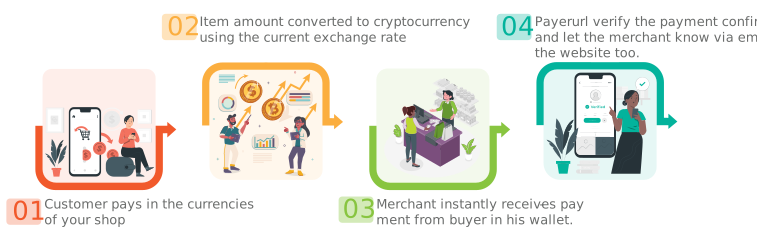
The Dhru USDT Payment Gateway is a specialized module designed for the DHRU Fusion platform. It allows admins to accept USDT (TRC20,ERC20,BEP20),USDC (TRC20,ERC20,BEP20), Ethereum (ETH), Bitcoin (BTC), and Binance QR payment directly. Unlike traditional gateways, this solution offers a direct merchant account experience with no middleware, ensuring that credits are added to user accounts automatically and instantly.
Key Benefits for DHRU Fusion Users
-
Direct-to-Wallet: Payments credit directly to your merchant account with no middleman holding your funds.
-
Zero-Delay Automation: The “Auto Add Credit” feature ensures your customers receive their balance immediately after blockchain confirmation.
-
Multi-Chain Support: Full support for Binance Payment, USDC TRC20 ERC20 BEP20, USDT TRC20 ERC20 BEP20, ETH, and BTC.
-
Privacy Focused: No complex KYC is required for basic operations, making it a fast and accessible solution for global businesses.
-
Ultra-Fast Setup: The entire integration takes less than 5 minutes.
Step-by-Step Installation Guide
1. Download & Prepare Files
-
Download the custom gateway module from our GitHub Repository.
-
Extract the ZIP file on your local computer.
2. Upload to Hosting Server
-
Log in to your CPanel or hosting file manager.
-
Navigate to:
public_html > modules > gateways. -
Upload the file
Payerurl.phpinto this directory. -
Next, upload the file
payerurl_res.phpdirectly into yourpublic_html(root) folder.
3. Admin Panel Configuration
-
Log in to your DHRU Fusion Admin Panel.
-
Go to Settings > Payment Gateways.
-
Find the module titled “USDT, ETH, BTC, Binance Pay” and click Activate.
4. API Integration
-
In the gateway edit screen, you will need your Payerurl Public Key and Secret Key.
-
Log in to your Payerurl Dashboard.
-
Navigate to Get API Key Credentials and select Generate New API Keys.
-
Copy these keys and paste them into the corresponding fields in your DHRU Fusion module.
-
Click Save. You will receive a notification confirming the successful installation.
Support
For support and questions, please contact us via:
- Telegram: https://t.me/Payerurl
- Website: https://payerurl.com